
Print Parking Tickets From Your Phone: The Android App With a Bluetooth Printer, No Third-Party Apps
The Parqueadero.app Android app prints the entry ticket and the exit receipt directly on a Bluetooth thermal printer, from the same phone you use to check cars in. There's no separate printing app to install, no PDF to "share" anywhere, and no internet needed to print: the attendant checks the car in and the ticket comes out on its own. It works with the portable 58 mm and 80 mm printers sold everywhere, including the cheapest one on the market.
For a long time the answer to "so how do I print the ticket?" was one of two: buy a computer with a desktop printer, or install a third-party app on the phone that receives the PDF and sends it to the printer. The first is expensive and ties the booth to a power outlet. The second works, but every ticket takes four taps: generate, share, pick the app, print. With the car waiting.
With the Android app that's over: one tap, and the paper comes out.
The problem: printing a ticket can't be a chore
At a parking lot the entry ticket is printed with the car at the gate and, often, another one behind it. Every second the attendant spends staring at the phone is a second of line.
With a third-party printing app the real flow was: check the car in, wait for the PDF, tap "share", find the printing app among the options, confirm. Four screens for a three-inch slip of paper. And when the printer was off, the error came from the other app, in technical jargon, and nobody knew what to do.
Beyond the time, there was a dependency: if that third-party app changed, started charging, or stopped working with the phone's Android version, the lot was left without tickets. It's a piece you don't control sitting in the middle of your operation.
What is the Parqueadero.app Android app?
It's the same system you use in the browser, packaged as an Android app, with a single new piece inside: the bridge to the Bluetooth printer. Everything else (check-ins, check-outs, rates, shifts, reports) is exactly the same, because the app loads the system as-is and updates itself whenever we publish an improvement. Nothing to reinstall.
What it adds:
- Print over Bluetooth the entry ticket and the exit receipt, directly, without going through any other program.
- Pick the printer once and have that phone remember it.
- Test printing from Settings, so you know everything's right before the first car.
- A clear message when something fails: "check that the printer is on" instead of a technical error, with the option to retry or fall back to the usual PDF.
It runs on any phone or tablet with Android 7 or later.
Which printer do I need?
Any 58 mm or 80 mm Bluetooth thermal printer, the kind sold as a "portable receipt printer" or "thermal ticket printer". They're the same ones delivery drivers and small shops use: small, battery-powered, and the paper is the ordinary thermal roll you can buy anywhere.
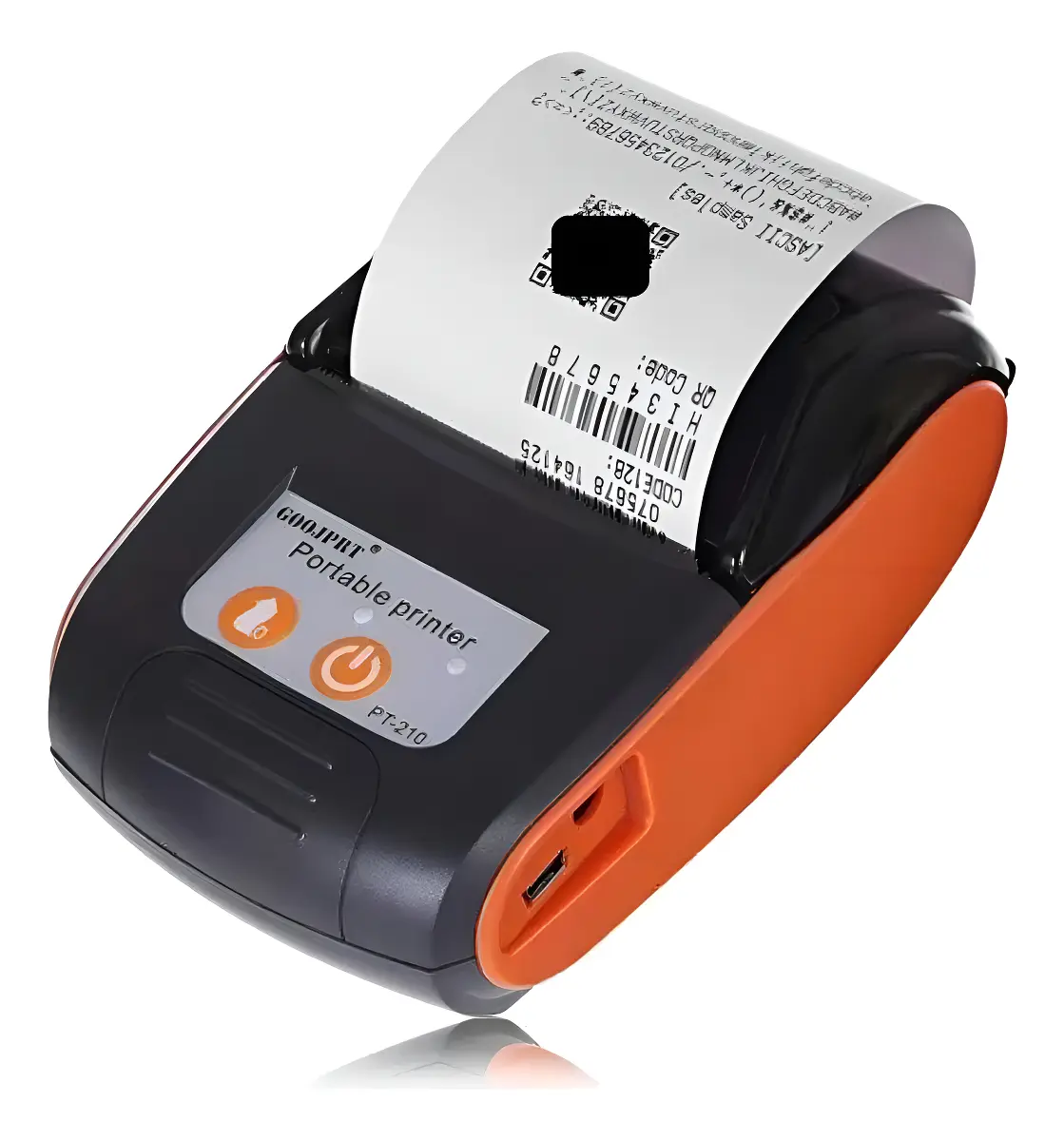
The one we recommend is the one in the photo: the GOOJPRT PT-210. It's the cheapest you'll find, it's on Amazon and at any electronics store, the battery lasts the shift, and we've tested it with the system: it works perfectly. You don't need anything more expensive to get started.
What to check when buying any other one:
| It should say | Why |
|---|---|
| Bluetooth (not USB-only or WiFi-only) | That's how it connects to the phone |
| 58 mm or 80 mm paper | The system prints in both widths; you pick yours in Settings |
| Thermal | No ink: paper is the only thing you buy |
| ESC/POS (almost all have it) | It's the "language" of receipt printers; the system speaks it |
If the printer you already have meets that, don't buy another: pair it and test.
How do I connect the printer?
Three steps, once per phone:
- Turn on the printer and pair it in Android's Bluetooth settings, like you would a pair of headphones.
- In the app, go to Settings → Printing → Printer, pick Bluetooth and tap Search for printers. The list of paired printers appears.
- Pick it and tap Test. A test ticket prints. Done.
The printer is remembered on that phone. If you have two booths with two phones, each remembers its own; the same attendant can move from one to the other without setting anything up.
And the choice between printing over Bluetooth or staying with PDF is separate: some lots have a printer and still prefer to send the ticket over WhatsApp. You pick that in the same place, and by default everything stays on PDF until you say otherwise.
What does it print and how does it look?
The same as the PDF, adapted to thermal paper:
- Entry ticket: lot name, license plate, vehicle type, date and time, the applicable rate, and the plate's barcode if you have it enabled, to scan at exit with the camera. Plus the header and footer you wrote.
- Exit receipt: entry, exit, duration, the charge breakdown and the total, with the payment method.
Paper width (58 or 80 mm) is set under Printing, and the system fits the lines to the width you chose. Nothing gets cut off.
What if the printer doesn't respond?
Getting switched off, running out of battery or moving out of range is normal in a booth. When that happens, the system doesn't show a technical error or jump to another screen: it tells you what to check (that it's on, has paper, and is paired) and gives you two buttons, Retry or Open the PDF.
The ticket is never lost: the check-in is already recorded. You're only deciding how the paper comes out.
Do I need internet to print?
No. The ticket is built on the phone and travels to the printer over Bluetooth, so printing doesn't depend on the connection. And since the system keeps charging without internet, the app + Bluetooth printer combination is a booth that works completely even when the network goes down: it checks in, charges and prints.
What's the difference from a third-party printing app?
| Third-party printing app | Parqueadero.app Android app | |
|---|---|---|
| Taps per ticket | 4 or 5 (generate, share, pick app, print) | 1 |
| Who talks to the printer | Another program, in the middle | The system, directly |
| If the printer fails | The other app's error, in jargon | Clear message + retry or PDF |
| Updates | Two apps to maintain | One, and it updates itself |
| Cost | Many charge a license | Included |
Who is it for?
The lot that already prints with a third-party app
It's the most immediate change: same printer, same roll, and the ticket goes from four taps to one. Nothing new to learn.
The lot that runs without a printer and wants to hand out paper
If today you send the ticket over WhatsApp or show it on screen and some customers ask for paper, with a cheap printer and the app you have it the same day.
The lot that was about to buy a computer and a desktop printer
Before spending on equipment that ties the booth to an outlet, try the phone you already have and a portable printer. It's a fraction of the cost and it moves with the attendant.
Events, fairs and temporary lots
Everything fits in a pocket: phone, battery printer and roll. Set up and torn down in five minutes.
When DON'T you need it?
- If you never print: if your customers are happy with the WhatsApp ticket, change nothing. The system in the browser stays the same.
- If your booth uses a computer with a USB desktop printer and it works well, the app adds nothing there; it's for printing from the phone.
- If you use an iPhone: the app is for Android. On iPhone and on the computer the ticket keeps coming out as a PDF as always.
How do I get the app?
The app isn't on the Play Store: it installs directly from a file we send you. Message us on WhatsApp and we'll send it over.
When you open the file on the phone, Android asks permission to install an app that doesn't come from the store; you accept once and that's it. You sign in with the same username and password as always, and everything you had configured is there.
Frequently asked questions
Does any Bluetooth printer work? Any 58 or 80 mm Bluetooth thermal receipt printer that speaks ESC/POS, which is almost every portable one. If in doubt, the GOOJPRT PT-210 is the one we tested and the cheapest.
Do I have to install another app to print? No. The Parqueadero.app app talks to the printer directly. No printing app, no "share", no PDF in between.
Does printing work without internet? Yes. The ticket is built on the phone and goes out over Bluetooth. The connection isn't involved.
Can I keep sending the ticket over WhatsApp? Yes. Bluetooth and PDF are two options you pick under Settings → Printing, and you can switch whenever you want.
What if I have two booths? Each phone remembers its own printer. You set each one up once and you're done.
Does the app update itself? Yes. It loads the system from our servers, so every improvement arrives without reinstalling. We only send a new file when something in the app's shell changes, and that's rare.
In short
The Parqueadero.app Android app prints the entry ticket and the exit receipt on a Bluetooth thermal printer with a single tap, with no third-party app and no internet. You buy the cheapest printer you can find (the GOOJPRT PT-210 works perfectly), pair it once, and the booth fits in a pocket: phone, printer and roll.
If your lot prints tickets from a phone or wants to start, Parqueadero.app is free and we'll send you the app over WhatsApp.
Published September 8, 2026.